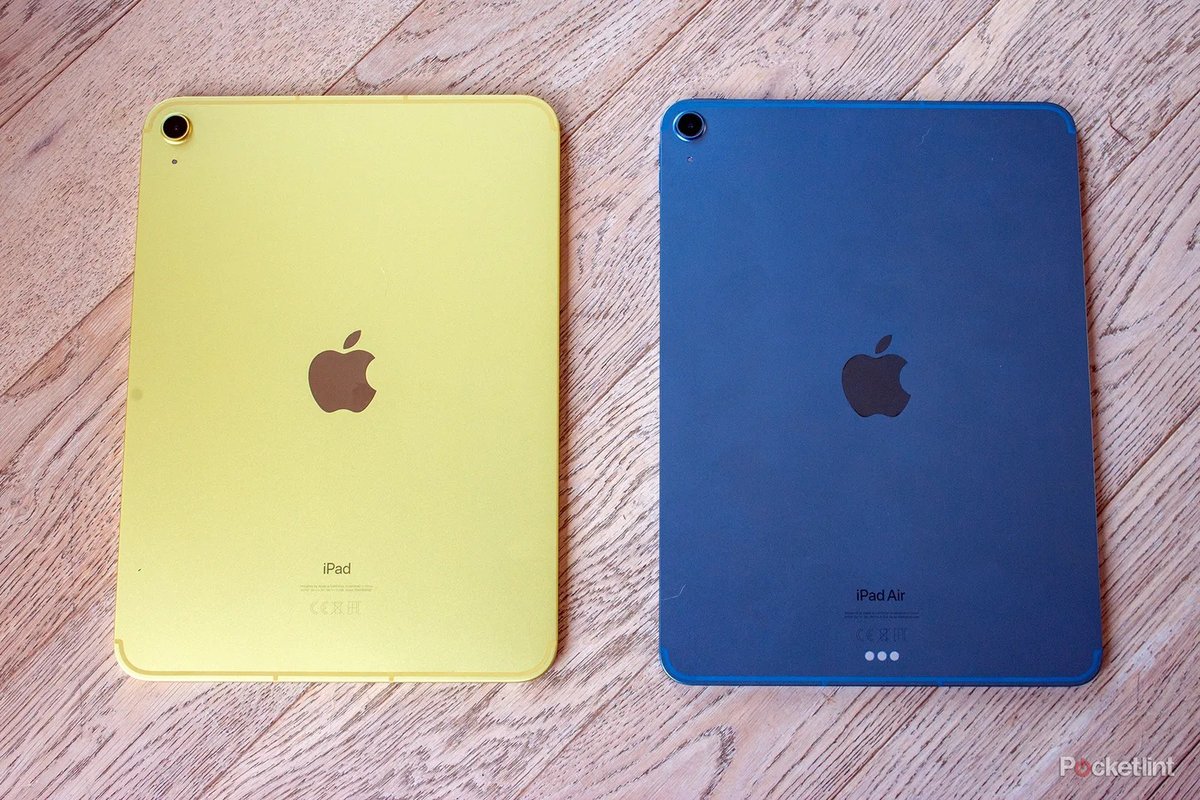
Choosing a new tablet can feel less like a simple purchase and more like navigating a dense tech labyrinth. With Apple's ever-expanding lineup and the competitive world of Android devices, it’s easy to get lost. Once a go-to for budget-conscious buyers, the iPad 9th Gen now stands as a relic, though still widely available, raising critical questions for anyone considering it. This guide cuts through the confusion, offering clear, actionable insights in your iPad 9th Gen Comparisons (vs. 10th Gen, Air, Android Tablets), ensuring you make the smartest choice for your needs.
At a Glance: Your Quick Tablet Cheat Sheet
- iPad 9th Gen: The last of its kind with a Home button and headphone jack. It's budget-friendly but features an older A13 Bionic chip, limiting its power and future-proofing. Supports only the 1st-gen Apple Pencil.
- iPad 10th Gen: A significant leap in design and performance with an A14 Bionic chip, an all-screen 10.9-inch display, and USB-C. It offers better value than the 9th Gen in most scenarios.
- iPad Air (2024): The "Goldilocks" option. Boasts a powerful M2 chip, a premium Liquid Retina display, and supports Apple Intelligence. Ideal for those needing more oomph than the basic iPad without the Pro's price tag.
- iPad Pro (2024): The powerhouse. Equipped with the M4 chip, Ultra Retina XDR display, and advanced features for creative and professional use. Supports Apple Intelligence.
- iPad Mini (2024): Prioritizes portability with an 8.3-inch display and an A17 Pro chip. A compact powerhouse for on-the-go users, also supporting Apple Intelligence.
- Android Tablets: Offer diverse options across various price points and form factors. They provide greater hardware flexibility and a different ecosystem experience compared to iPads.
- Storage: Aim for at least 256GB of storage to prevent quickly running out of space, as recommended by experts like Wirecutter.
- Apple Intelligence: This new feature is only compatible with iPads featuring M1, M2, M3, M4 chips, or the A17 Pro chip. Older A13, A14, and A15 chips do not support it.
The End of an Era: Why the iPad 9th Gen Still Gets Talked About (and Why It Probably Shouldn't Be Your First Pick)
The 9th-generation iPad holds a unique place in Apple's tablet history. Discontinued but still widely sold, it represents the final iteration of the classic iPad design, complete with the iconic Touch ID home button and a beloved 3.5mm headphone jack. For many, these legacy features hold a nostalgic appeal or serve a specific, practical need.
Under the hood, it’s powered by the A13 Bionic chip, which, while capable for everyday tasks like web browsing, email, and casual media consumption, is starting to show its age. Its 10.2-inch Retina display is perfectly fine for basic use, offering sRGB color and True Tone, but it falls short of the brighter, more vibrant Liquid Retina displays found in newer models. It only supports the 1st-generation Apple Pencil and relies on Bluetooth keyboards, lacking the robust integration of Apple's Magic Keyboard accessories.
For a long time, the 9th Gen was the undisputed champion of budget-friendly iPads. However, its discontinuation signals a shift. Now, with newer, more capable models often available at similar (or only slightly higher) price points, its value proposition has significantly diminished. Unless you find an exceptional discount or absolutely require that headphone jack, it's worth considering whether its older specs truly align with your long-term needs. For a deeper dive, you can Learn more about the iPad 9th generation.
The Main Event: iPad 9th Gen vs. iPad 10th Gen – A Generational Leap
This is often the most direct comparison buyers face when looking at entry-level iPads. While they might seem similar at a glance, the 10th-generation iPad represents a substantial modernization that makes it the default recommendation for most users today.
Design & Display: Old School vs. Modern Aesthetics
The most striking difference is in their appearance. The iPad 9th Gen clings to the classic design with chunky bezels and the familiar Touch ID home button below the screen. Its 10.2-inch Retina display is functional but standard.
The iPad 10th Gen, on the other hand, embraces a more contemporary, all-screen design. The home button is gone, replaced by Touch ID integrated into the power button, and the bezels are slimmer. It boasts a larger 10.9-inch Liquid Retina display with sRGB color and True Tone, offering a more immersive viewing experience for movies, games, and browsing. It also comes in a range of vibrant colors, adding a touch of personality.
Performance: A13 Bionic vs. A14 Bionic
At their core, the chips power the experience. The 9th Gen relies on the A13 Bionic, a chip first seen in the iPhone 11 lineup. It handles everyday tasks with ease, but you'll notice it struggling with more demanding apps, intensive multitasking, or future software updates.
The 10th Gen steps up to the A14 Bionic chip, previously found in the iPhone 12. This offers a noticeable boost in speed and efficiency, making everything feel snappier. Apps load faster, multitasking is smoother, and it's generally more capable of handling moderately complex tasks and graphics-intensive games. While neither supports Apple Intelligence, the A14 provides a better foundation for the years to come.
Pencil & Keyboard Support: A Tale of Two Generations (and a Dongle)
Accessory support is where things get a bit convoluted. The iPad 9th Gen works exclusively with the 1st-generation Apple Pencil. It connects via Lightning, which means you plug it directly into the iPad's charging port to pair and charge – a somewhat awkward setup. For keyboards, it’s limited to third-party Bluetooth options.
The iPad 10th Gen introduced a peculiar twist. It also supports the 1st-generation Apple Pencil, but because the iPad itself switched to USB-C, you need a separate USB-C to Apple Pencil Adapter to charge and pair. This is an extra cost and another item to carry. It also supports the more modern, two-piece Apple Magic Keyboard Folio, which offers a laptop-like typing experience and a built-in kickstand. The Magic Keyboard Folio is a game-changer for productivity compared to generic Bluetooth keyboards. If you plan to use an Apple Pencil or keyboard frequently, you might want to compare Apple Pencil models more closely.
Cameras: Landscape for the Win
Both models feature a 12MP Wide rear camera with 4K video capabilities. However, the front camera is a key differentiator. The 9th Gen has its 12MP Center Stage front camera positioned at the top when the iPad is held in portrait orientation.
The 10th Gen thoughtfully moved its 12MP Center Stage front camera to the landscape edge. This is a huge improvement for video calls, especially when using the iPad with a keyboard in a laptop-like setup, making you appear more naturally centered on screen.
Charging & Portability: Lightning vs. USB-C
The 9th Gen still uses Apple's proprietary Lightning port for charging and data transfer. This can be convenient if you have other older Apple devices, but it's increasingly becoming an outlier in a USB-C world.
The 10th Gen fully embraces USB-C. This means you can use the same charger as your MacBook, many Android phones, or other modern accessories, simplifying your cable management.
The Price Dilemma: Why the 10th Gen Often Wins
When the 9th Gen was new, it was significantly cheaper than its siblings. However, now that it’s discontinued, its street price often hovers surprisingly close to that of a new 10th-generation iPad. Given the 10th Gen’s superior design, better chip, USB-C, and improved accessory support, paying a little extra for the newer model almost always yields better long-term value and a more modern user experience.
| Feature | iPad 9th Gen | iPad 10th Gen |
|---|---|---|
| Chipset | A13 Bionic | A14 Bionic |
| Display | 10.2-inch Retina | 10.9-inch Liquid Retina |
| Design | Home button (Touch ID), larger bezels | All-screen (Touch ID in power button), slim bezels |
| Ports | Lightning, 3.5mm Headphone Jack | USB-C |
| Apple Pencil | 1st-generation (direct Lightning pairing) | 1st-generation (USB-C adapter required) |
| Keyboard | Bluetooth keyboards only | Magic Keyboard Folio, Bluetooth keyboards |
| Front Camera | 12MP Center Stage (portrait) | 12MP Center Stage (landscape) |
| Storage | 64GB, 256GB | 64GB, 256GB |
| Apple Intelligence | No | No |
Stepping Up: iPad 9th Gen vs. iPad Air (Modern Models) – When "Good Enough" Isn't Enough
If the 10th Gen is a leap from the 9th, the iPad Air is a flight. Comparing the 9th Gen to the 2024 iPad Air highlights just how much Apple's tablet technology has evolved, especially for users with more demanding needs.
The Performance Gap: A13 Bionic vs. M2 Chip – A Chasm of Power
This is arguably the most significant difference. The iPad 9th Gen's A13 Bionic chip is designed for basic tablet tasks. It's perfectly capable for checking social media, streaming video, or light gaming.
The 2024 iPad Air (and even the discontinued 5th-gen Air with its M1 chip) runs on an M-series chip – specifically, the M2 in the latest model. This is the same powerful chip found in older MacBook models and the 2022 iPad Pro. The M2 delivers truly professional-grade performance, capable of seamlessly handling intensive video editing, graphic design, complex multi-app multitasking, and high-fidelity gaming. Furthermore, the M2 chip means the iPad Air supports Apple Intelligence, unlocking a suite of powerful AI-driven features, a capability completely absent from the 9th and 10th Gen iPads.
Display & Design: Premium Visuals and Modern Versatility
The 9th Gen's Retina display is fine, but the 2024 iPad Air offers a vastly superior visual experience. Its 11-inch or 13-inch Liquid Retina display features P3 wide color for richer, more accurate hues, True Tone for adaptive white balance, and an anti-reflective coating that makes it much more comfortable to use in varying lighting conditions. The Air also boasts a sleeker, thinner, and lighter design than the 9th Gen, with USB-C for modern connectivity.
Accessories: Professional Tools for Power Users
The accessory ecosystem around the Air is designed for more serious use. While the 9th Gen is limited to the 1st-gen Apple Pencil, the iPad Air (2024) supports both the Apple Pencil Pro (with advanced gestures like squeeze and barrel roll) and the USB-C Apple Pencil. It also works with the full Magic Keyboard for iPad Air and the Smart Keyboard Folio, turning it into a legitimate laptop alternative for many tasks. These accessories elevate productivity far beyond what's possible with the 9th Gen's limited options. If you're looking to delve into the world of iPad accessories, the Air offers a much richer experience.
Target User: Casual Browser vs. Creative Prosumer
The 9th Gen caters to the casual user looking for an affordable tablet for entertainment and light tasks. The iPad Air, however, is built for the "prosumer" – someone who needs more power for creative pursuits, demanding productivity apps, or heavy multitasking, but doesn't quite need the absolute top-tier features (and price) of the iPad Pro.
| Feature | iPad 9th Gen | iPad Air (2024) |
|---|---|---|
| Chipset | A13 Bionic | M2 |
| Display | 10.2-inch Retina | 11-inch or 13-inch Liquid Retina (P3, anti-reflective) |
| Design | Home button, large bezels | All-screen, slim bezels, thinner, lighter |
| Ports | Lightning, 3.5mm Headphone Jack | USB-C |
| Apple Pencil | 1st-generation | Apple Pencil Pro, USB-C Apple Pencil |
| Keyboard | Bluetooth keyboards | Magic Keyboard for iPad Air, Smart Keyboard Folio |
| Apple Intelligence | No | Yes |
| Starting Storage | 64GB | 128GB |
Beyond Apple's Garden: iPad 9th Gen vs. Android Tablets – The Ecosystem Question
While Apple dominates the tablet market, Android tablets offer a compelling alternative, especially when comparing them to an older model like the iPad 9th Gen. The choice often comes down to more than just hardware; it's about the entire ecosystem.
Ecosystem: Walled Garden vs. Open Field
Apple's iOS is renowned for its simplicity, security, and the sheer quality and optimization of its app library. iPads offer a consistent, polished experience, and the App Store is meticulously curated. For many, this "it just works" philosophy is a major draw.
Android tablets, on the other hand, boast greater flexibility and customization options. You have more control over the file system, can sideload apps, and often have more diverse hardware choices from various manufacturers like Samsung, Lenovo, and Amazon. The app ecosystem is vast, though some might argue that tablet-optimized apps aren't always as polished as their iPad counterparts. If you're curious to understand the broader iOS vs. Android tablet ecosystem, this is a fundamental consideration.
Hardware Variety: Niche Needs and Price Points
With Android, you'll find a dizzying array of tablets. From ultra-premium devices like Samsung's Galaxy Tab S series, which often rival iPads on specs and features (and sometimes surpass them in areas like OLED displays), to budget-friendly options that cost a fraction of even the 9th Gen iPad. This variety means you can often find an Android tablet perfectly tailored to a very specific niche or price point that Apple doesn't address.
For example, some Android tablets offer expandable storage via microSD cards – a feature no iPad has. Others might include a built-in stylus, offer different display technologies, or focus on specific use cases like e-reading or kids' tablets.
Value Proposition: Where Android Shines
For pure affordability, especially if you're looking at entry-level or mid-range devices, Android tablets can often provide more bang for your buck than a discontinued iPad 9th Gen. You might get a newer processor, better screen, or more storage for the same price. This is particularly true if you're not tied to the Apple ecosystem and its specific app purchases or services.
Software Updates & Longevity: A Key Differentiator
Apple is renowned for providing long-term software support for its devices, often for 5-7 years or more. This means your iPad 9th Gen, despite its age, will likely continue to receive iOS updates for a few more years, even if it misses out on new features like Apple Intelligence.
Android's update landscape is more fragmented. Flagship Android tablets from major manufacturers like Samsung typically receive 3-4 years of major OS updates and security patches. However, cheaper or lesser-known brands might offer very limited or no updates, leading to a shorter lifespan for the device.
Peripheral Support: Apple's Advantage
While Android tablets support a wide range of Bluetooth styluses and keyboards, Apple's first-party accessories like the Apple Pencil and Magic Keyboard (for newer iPads) offer unparalleled integration and a seamless user experience that's hard to replicate on Android. For the 9th Gen specifically, the 1st-gen Apple Pencil is still a very capable stylus for notes and basic drawing.
Navigating the Current iPad Landscape: Beyond the 9th Gen
It's clear the iPad 9th Gen, while historically important, is no longer the go-to recommendation. The modern iPad lineup, including its newer discontinued models, offers vastly improved performance, features, and future-proofing.
The Smart Upgrade: iPad Air (2024)
If you're looking for a significant performance boost beyond the basic iPad without breaking the bank for a Pro, the 2024 iPad Air is the unequivocal choice. Its M2 chip provides remarkable power for creative work, gaming, and demanding applications, all while supporting Apple Intelligence. With two screen sizes (11-inch or 13-inch), a beautiful Liquid Retina display, and compatibility with the Apple Pencil Pro and Magic Keyboard for iPad Air, it truly hits the sweet spot for many users.
Portability Redefined: iPad Mini (2024)
For those who prioritize ultimate portability, the 2024 iPad Mini is in a league of its own. Its 8.3-inch Liquid Retina display makes it incredibly easy to carry and use one-handed, yet it packs a punch with the A17 Pro chip and Apple Intelligence support. It's perfect for commuters, travelers, or anyone who wants a powerful tablet that can slip into almost any bag. While it only supports Bluetooth keyboards, its primary appeal is its compact power.
Unrivaled Power: iPad Pro (2024)
For digital creatives, designers, video editors, and professionals who demand the absolute best, the 2024 iPad Pro is the ultimate tool. Featuring the groundbreaking M4 chip, an stunning Ultra Retina XDR display with ProMotion, and advanced camera features, it's designed to push the boundaries of tablet computing. It fully supports Apple Intelligence, the Apple Pencil Pro, and the Magic Keyboard for iPad Pro. This is a no-compromise device for those who need peak performance.
Discontinued Models to Approach with Caution
While this article focuses on the 9th Gen, it's worth noting other discontinued iPads that might still appear on sale.
- Discontinued 5th-generation iPad Air: It runs on the older M1 chip but does support Apple Intelligence. However, its storage is limited to 64GB or 256GB, and its front camera is at the top (vs. landscape on the 2024 model). Generally, the newer 2024 iPad Air with its M2 chip and more versatile camera placement is a better investment unless you find a substantial discount on the 5th-gen Air.
- Discontinued 5th-generation iPad Mini (2021 model): This model has an A15 Bionic chip, which does not support Apple Intelligence. It offers a 64GB storage option. Unless you specifically need that 64GB mini or a unique pink color option with a significant discount, the 2024 iPad Mini offers a much more powerful and future-proof experience.
The key takeaway for discontinued models: their prices are often too close to their newer, more powerful counterparts. Unless a specific, niche feature (like the 9th Gen's headphone jack) or an unbelievably deep discount makes them attractive, the newer models almost always represent a better long-term investment.
Key Decision Factors When Choosing Your Next Tablet
Stepping back from the spec sheets, here's how to simplify your decision, whether you're eyeing a current iPad, an older model, or an Android alternative.
Your Budget: The Primary Driver
Be realistic about what you want to spend.
- Under $300-350: You're likely looking at older iPads (like a heavily discounted 9th Gen) or a wide range of Android tablets. Focus on core performance and display quality for the price.
- $350-$500: The iPad 10th Gen is a strong contender here, offering a modern experience. Some mid-range Android tablets also fall into this category, often with more storage or specialized features.
- $500-$800: This is iPad Air territory, providing significant power and premium features for most users.
- $800+: You're entering iPad Pro and high-end Android tablet territory, suitable for professionals and those needing peak performance.
Intended Use: What Will You Actually Do With It?
- Media Consumption (streaming, e-reading): The iPad 9th Gen or 10th Gen, or a budget Android tablet, will suffice.
- Notes & Basic Productivity (email, documents): iPad 10th Gen with the Magic Keyboard Folio, or an iPad Air. A capable Android tablet with a good stylus also works.
- Creative Work (drawing, light video editing, graphic design): iPad Air (M2) or iPad Pro are highly recommended. A high-end Android tablet like a Samsung Tab S series can also perform well.
- Gaming: Any M-chip iPad will deliver an exceptional experience. Even the A14 in the 10th Gen is quite capable.
- Portable/Travel Companion: iPad Mini is unmatched for its form factor.
Performance Needs: A-series vs. M-series, and Apple Intelligence
- Casual use, light multitasking: A13 (9th Gen) or A14 (10th Gen) is fine.
- Demanding apps, pro workflows, future-proofing: M1, M2 (iPad Air), M4 (iPad Pro), or A17 Pro (iPad Mini) are essential. These also grant access to Apple Intelligence. If AI features are important to you, then any A13, A14, or A15 iPad is immediately out of the running.
Screen Size & Portability: Find Your Sweet Spot
- Maximum portability: iPad Mini (8.3-inch).
- Balanced size for media and productivity: iPad 9th Gen (10.2-inch) or 10th Gen / Air (10.9-inch to 11-inch).
- Large canvas for creative work/multitasking: 13-inch iPad Air or 13-inch iPad Pro.
Accessory Ecosystem: Pencil and Keyboard Compatibility
Consider which Apple Pencil generation you need (1st Gen, USB-C, or Pro) and whether you want to use Apple's first-party keyboards (Magic Keyboard Folio, Magic Keyboard) or if third-party Bluetooth options are sufficient. This will significantly narrow down your choices, especially when you how much iPad storage you really need.
Storage Requirements: Don't Skimp!
This is a common pitfall. Wirecutter wisely recommends at least 256GB of storage. While 64GB might seem like enough initially, modern apps, high-resolution photos and videos, and downloaded media can quickly fill it up, leading to frustrating storage management. It's almost always better to pay a bit more upfront for sufficient storage.
The Ecosystem Question: Apple vs. Android
Are you already invested in Apple's ecosystem (iPhone, Mac, Apple Watch)? An iPad will integrate seamlessly. Do you prefer more open platforms, greater hardware variety, or have a specific use case best served by Android? Consider an Android tablet. Your existing device ecosystem plays a huge role in convenience and continuity. For those on a student budget, you might also consider exploring the best iPads for students.
Common Questions About Buying an Older iPad
"Is the iPad 9th Gen still good in 2024?"
For basic tasks like web browsing, email, streaming, and very light gaming, yes, the iPad 9th Gen is still functional. Its A13 Bionic chip is certainly not underpowered for these activities. However, it will feel slower than newer models, especially when multitasking, and it misses out on critical modern features like USB-C, a landscape front camera, and Apple Intelligence.
"What's the main reason to choose the 9th Gen over the 10th Gen?"
There are only two primary reasons:
- Price: If you find a truly significant discount on the 9th Gen (e.g., hundreds of dollars less than the 10th Gen), it might be worth considering if budget is your absolute top priority and your needs are very basic.
- Specific Features: If the physical Home button or the 3.5mm headphone jack are absolute non-negotiables for you, the 9th Gen is the last iPad to offer them.
In most other scenarios, the 10th Gen offers a superior experience for a marginal price difference.
"Will the iPad 9th Gen get future iOS updates?"
Yes, it's highly likely to receive iOS updates for a few more years, maintaining security and compatibility with new app versions. However, it will not support Apple Intelligence, and future major OS features might become exclusive to newer hardware. Its lifespan for optimal performance will be shorter than a newer iPad.
"Are Android tablets ever better than iPads?"
"Better" is subjective and depends entirely on your priorities. Android tablets can be "better" if you:
- Need a specific feature not found on iPads (e.g., expandable storage, certain form factors).
- Prefer a more open, customizable operating system.
- Are heavily invested in the Google ecosystem.
- Require a tablet at a very specific, often lower, price point that Apple doesn't offer.
- Want greater hardware variety from multiple manufacturers.
For many, iPads offer a more streamlined, user-friendly experience with a generally more robust app ecosystem, but Android tablets absolutely have their place.
Your Next Steps: Making an Informed Tablet Choice
The journey to your perfect tablet, especially when weighing iPad 9th Gen Comparisons against the 10th Gen, Air, and Android rivals, boils down to matching your real-world needs with the right device. The iPad 9th Gen, while a valiant workhorse in its time, is increasingly a niche pick. For most, the iPad 10th Gen offers a significant upgrade in design and performance without a massive jump in price. Stepping up to the iPad Air opens up a world of M-chip power and Apple Intelligence for serious productivity and creative work. And don't forget the diverse and often cost-effective options within the Android tablet market.
Take a moment to honestly assess your budget, what you'll use the tablet for, and how important cutting-edge features like Apple Intelligence or specific accessory support are to you. By considering these factors, you'll move confidently past the confusion and land on a tablet that truly enhances your digital life.